
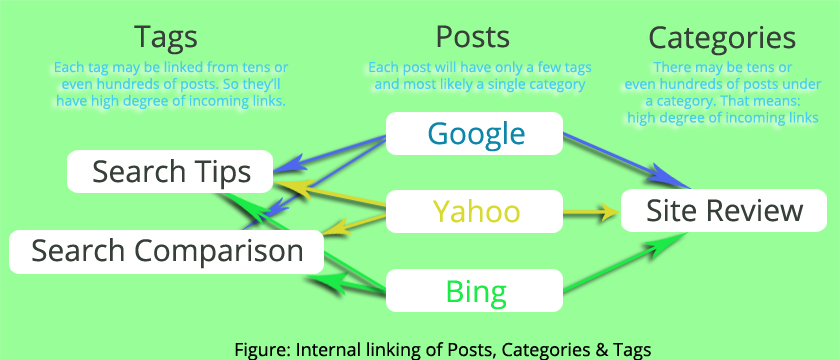
Short Answer: There is no straight forward yes/no answer to this question. If you are running a typical Blog using WordPress, where your category and tag pages only contain excerpt from belonging posts, then the answer is no, you shouldn't allow search engines to index your category and tag pages. If you have unique content to those category and tag pages, then the answer is yes, you should index them for better SEO.
Noindex Category & Tag pages if they contain only post excerpt & no unique content
Here is why you shouldn't index tag/category pages with no unique content & only excerpts from posts:
Search engines rank your pages using internal and external linking to and from your pages: higher the incoming link, higher the rank + higher the rank of the incoming links higher the rank of your link.
Each search engine has it's own ranking algorithm, but the basic idea is the same. You may not have any control over the external linking, so I'm giving an example only using internal linking. say you have three blog entries:
http://YourSite.com/bing-search-engine/, http://YourSite.com/yahoo-search-engine/ and http://YourSite.com/google-search-engine/
and these blog entries are under the category named Site Review: http://YourSite.com/site-review/
Now notice that, the Site Review category page will have linking from all three blog posts, but each of these posts will be linked only once from the category page itself. So, search algorithms will give the category page higher priority!
So in essence, if users search something and find your site in the result, in most cases they will find your category page instead of the post that contains the original information. This is a typical case. Because in a typical installation, Category pages of your blog contain only excerpts (i.e. a short description) from the original posts.
So, for a typical WordPress Category SEO, where you have no other unique content for that category, it's safe to index your blog entries only & make category pages noindex
The same applies for WordPress Tags SEO as well. Because in a typical installation, Tag pages of your blog also contain only excerpts from the blog posts. So you almost always gain nothing by indexing your tag pages that only contain post excerpts.
So make the typical tag pages noindex as well (if the tag pages contain no unique content), for better blog tags SEO.
Same applies for blogs other than WordPress as well. However, if you run a different type of site (something other than blogging), then this decision will solely depend on the type of your site and the content they have.
Index Category & Tag pages if they contain unique content
Do your category or tag pages have additional content other than the post excerpts or do they have added value to your site in any other meaningful way?
If the answer is yes, then go ahead and index them. If the answer is no, then don't index your category and tag pages.
There is a very good WordPress plugin named Yoast SEO that can manage all these for you. So install this plugin and configure everything you need from the admin panel of the plugin.
Remember that search engines will still crawl your category and tag pages, regardless of your indexing in the XML sitemap or search bot setting (either in meta tag or in robot.txt file). The only affect of not indexing them (where appropriate) is: they (category and tag pages) will not have higher ranking over the individual blog entries and pages.
Also, note that while giving the above suggestion, I've assumed that in your WordPress installation (or any other blog), the category and tag pages have a higher degree of incoming internal links. This can differ from theme to theme, but in most cases they do have higher incoming links than individual posts.
To go a step further: you better have unique content in all of your category and tag pages and then index them to get ranking for terms that are specific to those category and tag pages only.
Let's revisit the example: lets say your posts on Google, Bing and Yahoo contains information on how good or bad these search engines are and specific tips on how people can get most benefit from the specific search engines. We've already assumed that they are under site review category, now let's also assume that the posts have two common tags named Advanced Search Tips & Tricks (http://YourSite.com/topics/advanced-search-tips-tricks) & Search Engine Comparison (http://YourSite.com/topics/search-engine-comparison). If you were following my post carefully, you already know what I'm doing here. Yes, you've guessed it right!
At the beginning, you'll only have post excerpts on those tags and category pages. So you'll give them noindex, so that if someone search for "Yahoo Search pros and cons" in google, your post http://YourSite.com/yahoo-search-engine/ will show up, not the category page http://YourSite.com/site-review/ or the tag page http://YourSite.com/topics/search-engine-comparison.
However, as you can see yourself, those category and tag pages are a great opportunity to rank on a different set of keywords! So write at least a 300 words article on the site review category page, for example, what is a site review, how did you reviewed the sites, whether or not you'll review a site on request from your visitors etc. etc. So your category page will now have unique text content on site review, and the belonging excerpts from your Google, Yahoo and Bing posts will only come after that content. Same applies for the tags. Write at least 300 words articles (Yoast SEO plugin will allow you to write articles on tag pages) on Advanced Search Tips & Tricks and Search Engine Comparison tag pages. At this point, go back and make these category and tag pages to index.
Now search algorithms will correctly rank your posts on specific related terms and at the same time, your category and tags pages will be ranked for keywords like "site review", "advanced search tips", "search engine comparison" etc. etc. but none of them will compete with each other, because they don't have duplicate content now. Isn't that Great!
To summarize: Index category and tag pages only when you have unique content in those pages, until then, keep them with noindex. If some of them have unique content and some of them don't, then give them index and noindex accordingly.
Happy blogging 🙂
Hi, I can see categories in your site are indexed and they do not have any unique description which is contradicting with your suggestions in the above article, could you kindly elaborate on this?
Yes, the answer is simple: I don't maintain this site with SEO in mind, LOL.
P.S. Actually I'll change this soon, I'm working on the renovation of this site. Come back in a month 🙂
Thanks for this post with a detailed explanation. I am using Yoast free plugin, really good and very helpful for beginners like me.
Hey, Informative article but I have a question I own an entertainment site so should I allow indexing of tags and categories or not. Thanks
Thanks for this information Fayaz. I was really confused about index and noindex tag and category in wordpress. Your well written description make it very easy and clear to understand for me.
Thanks for this tutorial, I have been doubting if I should no-index tags and categories on my blog; I will definitely do that now.
Thank you a lots for this detail explanations. Am heading on to noindexing my categories
Thanks for sharing this article.
I tried to open an Adsense account but I got a mail saying I had copied contents. Immediately I blocked the tags and categories from search engine, Adsense was approved.
I think it is advisable to block them when running a typical blog.
Finally after reading ur explanation, i decide to disable indexing my tags, and category pages. Thank you.
I am not using WordPress but I do have a question. I have a site that is an eCommerce site. I want to add part numbers as product titles and then have filters so people can decide the exact category of products they want to see. For example lets say it is cell phones. I would be putting all the different cell phones available and all the accessories. Then the visitor can say they want to filter out just Samsung>Cases. Or LG>Batteries.
So in the products I am adding tags that each part number would go with. As an example say I have a battery part number 123 battery but it can be used in a Samsung Galaxy 7 and 8. I am creating tags that go on the batteries that they can use as long as there are multiples. So the flow would be the following for the product:
Cell Phone Batteries Parts and Accessories. Then they would filter down to get to that battery. The tags on the product would be: Samsung Galaxy 7 Battery, Samsung Galaxy 8 Battery.
The resulting tag page would say " Items marked by the tag "Samsung Galaxy 7 Battery":
Products" 123 Battery, 124 Battery, 125 Battery.....
Would this be considered also duplicate content since it is not creating different content it is just showing that all of them fit a particular brand.
Reason I ask is that in the past Tags have always drawn good traffic for me with results in Google showing " Items marked by the tag "
For a sitemap I was using the eCommerce software but it is kicking back allot of errors but it didn't include tags in the sitemap. So now I am using a standalone sitemap and it does include the tags. I can disallow them but I am not sure I want to.
Any advice?
First make sure that you are actually getting benefits from those tags. Usually you'll probably get the same benefits even without them. Best if you provide some unique content for them, even if those content are auto generated. That way you'll not have to worry about giving them no-index.
hi nice answer, but i want to say catogories and tags make duplicate issue on various search engine ...but you explain very simple words nice.
thankx
Very informative post. I have a blog and all the tags and categories indexed in the search result. After reading this article I am going to remove all those links.
Thank You!